Project Proposal
Our valuables such as electronics, backpacks, and wallets are the most important objects that we carry with us everyday. They are very valuable to us and carry everything we need to survive in this society. But, when they get misplaced, stolen, or destroyed, then our lives are ruined in an instant. We need a way to be able to prevent it and act quick if the situation ever arises. In fact around 1,000 purses and wallets are stolen every two minutes in the U.S (Floor). With statistics like these we need to be able to keep track of our belongs and easily locate them in the best and most discrete way possible. By utilizing the internet of things, we can develop a thin tracker with a discrete color that can be used for backpacks, wallets, purses, and keys. The device will feature a variety of forms and colors and will include a user-friendly tracking interface with augmented reality features as well as predictive location using AI. The tracker will have enhanced functionality for recovery using Bluetooth and GPS technology with a user interface and voice features using Alexa or Siri.
References:
Floor, Top. “What to Do If Your Purse or Wallet Is Stolen.” Bank Five Nine, 1 Sept. 2024, www.bankfivenine.com/everyday-money/what-to-do-if-purse-or-wallet-is-stolen/#:~:text=it’s%20believed%20that%3A-,Around%201%2C000%20purses%20and%20wallets%20are%20stolen%20every%20two%20minutes,YEAR%20in%20the%20U.S.%20alone!
Intended user
The user who benefits from this product is anyone who has a habit of losing their belongings in public or at home. It can be helpful for people who tend to forget a lot and need to find misplaced items quickly. Its also good for people who are typically running late and need something found fast and efficiently. These people can be careless at times with their items, but with a good recovery system, they can have some peace of mind.
Timeline
Monday November, 18th – 22nd: Planning and sketches of the app.
Monday November, 25th – 29th: Prototype of design.
Monday December 2nd: Filming scenes of Alexa.
Tuesday December, 3rd – 7th: Editing video demonstration.
Sunday December, 8th: Case Study
Components Table
| Purpose | Functionality | User Goals | Technology Requirements | |
| Internet enabled product: Seeker, Tile, or Apple Air Tag Tracker. | The tracker is the most important device in the ecosystem. It communicates with the user’s phone. | The tracker sends a GPS or Bluetooth signal to the phone to show its location. It can also be rung with a phone to its internal speaker. | The user can find their belongings quickly especially at home. | Bluetooth. Wifi. GPS. Speaker. Vibration Motor. Long lasting battery. |
| Mobile App | The Seekers mobile app provides a simple user interface for the user to see where their devices are, and to access helpful locating features. | The mobile app receives the signal from the tracker and can locate it with the map. The user can access features like Augmented Reality, predictive location, or simply ringing the device. The user has multiple options including turning on the voice experience which connects with a Siri/Alexa product. | The user has access to many helpful features to track their device. They can act quickly and find their belongings with ease. | Bluetooth. Wifi. GPS. Speaker. Vibration Motor. Microphone Camera |
| Voice Experience | The voice experience is used to help the user find their object at home. They can request Alexa or Siri for helpful tips and suggestions on where to look based on the user’s history. | The Voice experience uses an Alexa device or Apple Siri and connects to the mobile app. | The user can ask the voice interface for help when looking for a product. They can also ask for any data involving the tracker’s location history. | Amazon Alexa. Apple Siri mobile phone |
| Augmented Reality feature | This feature of the app is used to locate trackers within Wifi distance of the user’s phone. The app opens the phone’s camera and the user can use it to look for their item with the help of an augmented reality icon hovering over the object. | The feature uses the mobile app to open the camera of the phone and scan around the room to locate the tracker. The tracker sends a Wifi signal to the phone which makes the AR icon show in the user’s screen. | When losing belongings in couches or under furniture, the AR mode will tell the user where exactly it is by just scanning around the room. It will show an icon hovering over the tracker which can help the user find their belonging quickly. | Phone Camera Stable Wifi connection. |
| Human | The human places their tracker on a belonging that they lose often so that they can locate it quickly in case it was lost or forgotten. | The user can use their phone or Amazon Alexa to locate devices near and far from home. | The user will be able to quickly find their belongings. | N/A |
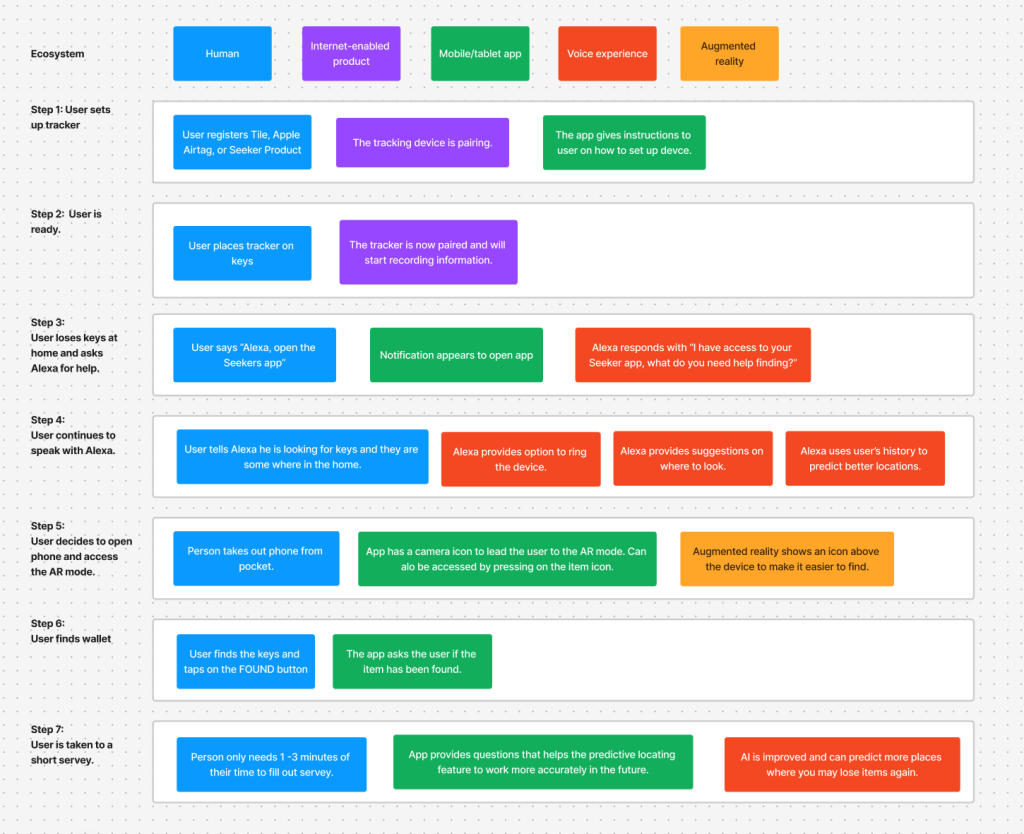
Multi-device flowchart
Video Demonstration
Project Retrospective
This project was overall very challenging. I struggled in the brainstorming process because I was not fully committed to certain ideas. I then ended up with a tracking device and had to come up with ways to make it better than its competitors, which was also very challenging. The video editing part of the project was frustrating and very time consuming.
I really enjoyed creating the app when designing it through Figma. i am more familiar with this program so designing the app felt very quick and easy.
I struggled when using different forms of planning like the components table and multi-device flowchart. I am familiar with creating sketches and a flow chart before starting the design, so this was a new creative process for me. I still created sketches for the app and a storyboard to create the video. However, I did not use the storyboard due to time constraints.
I faced challenges when thinking about the way I could incorporate the augmented reality example into a prototype on Figma. To face this challenge, I used Adobe AR to create a video demonstrating how the feature would work. I had to quickly look up a tutorial on the mobile app and once I practiced I uploaded my example into Figma.
I prefer designing for digital work since it is more streamlined, but I now have some knowledge with designing for connected experiences, so I wouldn’t mind working on more projects like that.
For this project, you had to simultaneously focus on original concept, physical/digital interaction, and movie magic. How did you juggle those responsibilities? Which were your strengths? Which can you improve on, and how will you work on those areas of improvement in future projects?
For this project, I had to simultaneously focus on an original concept, physical/digital interaction, and movie magic. I unfortunately put too much time trying to figure out an original concept for the project. Once I received help from my professor, I was able to get the gears running. I felt very confident when creating the digital and physical interaction of the product. I felt happy with the design and made a few tweaks here and there. Since I don’t have much editing experience, the movie magic portion took so much time as I was trying to refresh my Premiere Pro skills. I wish I was pretty fluent on the software as I would have created a commercial like quality to the demonstration video. Next time, I will focus on brainstorming ideas quicker and improving my video editing skills.
 Alberto Flores Portfolio